Qu’est-ce qu’une machine à fabriquer des cartes d’étudiant ?
Comme son nom l’indique, une machine à fabriquer des cartes d’étudiant, également appelée imprimante de cartes d’étudiant, est un système tout-en-un conçu pour imprimer, coder et délivrer des cartes d’identification personnalisées pour les étudiants. Il est intéressant de noter que ce n’est pas seulement une machine ; elle inclut également un logiciel de conception de cartes et des techniques de codage qui rendent chaque carte unique et exclusive.
Qui utilise les imprimantes de cartes d’étudiant ?
Cela peut sembler une question évidente. Les établissements scolaires, de la maternelle jusqu’aux collèges et universités, utilisent largement les imprimantes de cartes d’identification ; elles permettent non seulement de créer des cartes pour les étudiants, mais aussi pour le personnel enseignant. Une machine à fabriquer des cartes d’identification peut produire des badges pour les étudiants, le personnel d’entreprise et toute organisation ayant besoin d’identifier ses employés ou visiteurs, créant ainsi un justificatif distinctif.
De manière générale, les machines à fabriquer des cartes d’étudiant sont largement utilisées dans les organisations ou institutions suivantes :
Écoles primaires et secondaires (K-12)
Universités et collèges
Cela inclut les bibliothèques, les résidences universitaires, les cafétérias et d’autres lieux ou événements au sein de l’établissement ou du campus.
Si vous faites partie du service des achats d’un établissement scolaire et que vous cherchez actuellement à acheter une imprimante de cartes pour fabriquer des cartes d’étudiant, je pense qu’il ne sera pas inutile d’en apprendre un peu plus sur le fonctionnement de ces machines pour garantir une décision d’achat éclairée.
Tout d’abord, examinons les différentes catégories ou types de machines à cartes d’étudiant.
Les 3 types populaires de machines à cartes d’étudiant sur le marché
Voici un aperçu rapide, suivi d’une analyse détaillée :
Type |
Idéal pour |
Caractéristique clé |
Avantages |
Inconvénients |
|
1. Imprimantes Direct-to-Card (DTC) |
La plupart des écoles & universités (le cheval de bataille standard) |
Imprime directement sur la surface de la carte PVC. |
Économique, rapide, fiable pour la plupart des besoins. |
Peut avoir des difficultés avec les cartes à surface inégale (ex. avec puces). |
|
2. Imprimantes Retransfer |
Cartes haute sécurité & premium (ex. avec puces intelligentes) |
Imprime sur un film qui est ensuite fusionné sur la carte. |
Durabilité supérieure, impression jusqu’au bord, gère parfaitement les cartes à puce.. |
Coût initial plus élevé, plus lent pour les cartes individuelles. |
|
3. Systèmes d’émission centralisée |
Grands districts/Universités (pour la production en masse) |
Les imprimantes à haut volume sont séparées du processus de codage/personnalisation. |
Sécurité maximale, vitesse et qualité les plus élevées pour les grands lots. |
Pas pour une émission immédiate ; complexe et coûteux. |
Analyse détaillée des 3 types d’imprimantes d’identification pour cartes d’étudiant
1. Imprimantes Direct-to-Card (DTC)
C’est le type le plus courant et le plus populaire, que l’on trouve dans les bureaux des écoles.
Idéal pour : L’émission de cartes immédiate pour les nouveaux étudiants, les remplacements et le personnel. Elle fonctionne bien avec les cartes à bande magnétique, cette dernière étant codée après l’impression.
Fonctionnement : L’imprimante utilise une tête d’impression thermique pour chauffer un colorant solide (provenant d’un ruban couleur) et le transfère directement sur la surface d’une carte PVC vierge. Une surcouche protectrice transparente est généralement appliquée lors du même passage.
Pourquoi elle est populaire : Elle offre le meilleur équilibre entre coût, vitesse et qualité pour la grande majorité des besoins scolaires. Elle est parfaite pour imprimer à la demande des cartes avec photos, codes-barres et logos.
2. Imprimantes Retransfer
C’est le choix premium pour les cartes devant être plus durables ou contenir une technologie embarquée.
Idéal pour : Les universités et collèges délivrant des cartes d’étudiant multifonctions servant également de cartes d’accès aux résidences et laboratoires, de cartes de paiement et de cartes de bibliothèque.
Fonctionnement : L’imprimante imprime d’abord le design de la carte à l’envers sur un film transparent. Ensuite, le film est chauffé et pressé sur la carte, enveloppant l’image autour des bords et créant une finition laminée parfaite.
Pourquoi elle est populaire :
Impression jusqu’au bord : Pas de bord blanc ; aspect plus professionnel.
Durabilité supérieure : L’image est entièrement protégée sous le film, la rendant très résistante aux rayures et aux produits chimiques.
Gère parfaitement les cartes à puce : Elle peut imprimer des images impeccables sur des cartes à surface inégale, comme celles avec des puces RFID ou NFC intégrées, sans endommager la tête d’impression.
3. Systèmes d’émission centralisée
Ils sont utilisés par les grandes institutions produisant des cartes en grand volume et nécessitant le plus haut niveau de sécurité.
Fonctionnement : Il s’agit d’un processus plus industriel. Des imprimantes à haut volume (qui peuvent être DTC ou Retransfer) sont utilisées pour imprimer des cartes par lots. Les données de personnalisation (comme le codage des puces intelligentes) sont souvent traitées par un système sécurisé distinct. L’ensemble du processus est géré dans un lieu centralisé et contrôlé, pas à un comptoir d’accueil.
Pourquoi ils sont populaires : Pour les opérations à grande échelle, c’est la méthode la plus efficace et la plus sécurisée. Elle permet un contrôle qualité strict et sépare les rôles de production et d’émission des cartes pour prévenir les fraudes internes.
Idéal pour : Les grands réseaux universitaires ou les districts scolaires qui produisent des milliers de cartes au début de chaque semestre.
Il est conseillé de choisir parmi ces 3 types de machines à fabriquer des cartes d’identification pour étudiants, en tenant compte également du budget.
Comment fonctionnent les machines à imprimer pour fabriquer les cartes d’étudiant ?
Voici le flux de travail étape par étape typique pour créer une carte d’identification avec un tel système :
Étape 1 : Concevoir le modèle de carte
L’administrateur utilise le logiciel dédié sur l’ordinateur connecté pour concevoir l’apparence de la carte. Cela inclut l’ajout du logo et du nom de l’école, des champs pour le nom de l’étudiant, son numéro d’identification, sa classe, et un emplacement pour la photo.
Étape 2 : Saisir les données de l’étudiant
Les informations de l’étudiant (nom, numéro d’identification, etc.) sont saisies dans le logiciel, souvent importées d’une base de données scolaire ou tapées manuellement.
Une photo numérique de l’étudiant est prise ou a été préalablement enregistrée. Le logiciel dispose souvent d’un outil intégré pour capturer et recadrer la photo à la taille correcte.
Étape 3 : Imprimer la carte
Une carte en plastique PVC vierge (de la taille d’une carte de crédit) est insérée dans l’imprimante.
L’imprimante utilise un procédé de sublimation thermique ou de transfert thermique : elle chauffe des colorants solides, les transformant en gaz qui pénètrent la surface plastique de la carte. Cela crée une image durable, haute résolution et de qualité photo qui ne s’éraflera ni ne s’estompera facilement. De nombreuses imprimantes appliquent une couche de protection en un seul passage pour rendre la carte encore plus durable.
Étape 4 : Coder la carte (pour les cartes à puce)
Si la carte possède une bande magnétique ou une puce RFID, l’imprimante ou un codeur séparé y écrit des données après l’impression. Il peut s’agir de :
Bande magnétique : Codée avec le numéro d’identification de l’étudiant pour l’emprunt de livres en bibliothèque ou les achats à la cafétéria.
Puce RFID/NFC : Codée avec des données sécurisées pour le contrôle d’accès (ex. : ouvrir les portes des résidences, entrer dans le gymnase ou se connecter aux ordinateurs).
Toutes les cartes ne seront pas traitées avec des fonctions d’authentification ou codées, sauf si l’imprimante elle-même est équipée de cette fonctionnalité.
Étape 5 : Délivrer la carte
La carte terminée est éjectée de l’imprimante, prête à être utilisée immédiatement par l’étudiant.
Il s’agit d’un processus d’impression général des machines à imprimer les cartes d’étudiant, qui peut varier selon le type spécifique.
Outre le type d’imprimante, voici les caractéristiques et avantages clés essentiels à prendre en compte :
Émission à la demande : Les cartes peuvent être faites instantanément lors de l’inscription des étudiants, éliminant les longues attentes de traitement et d’envoi par un bureau central.
Haute sécurité : Les systèmes modernes peuvent inclure des fonctionnalités de sécurité comme des surcouches holographiques, l’impression UV (visible uniquement sous lumière noire), du microtexte et des images fantômes pour prévenir la contrefaçon.
Multifonctionnalité : En codant des bandes magnétiques ou des puces RFID, une seule carte peut servir de carte de bibliothèque, de carte de repas, de clé d’accès et de carte de paiement.
Rentable : Pour une école, posséder une machine est plus économique à long terme que de sous-traiter la production de cartes à un tiers.
Contrôle total : Les écoles peuvent facilement remplacer les cartes perdues, mettre à jour les informations et émettre des cartes pour les nouveaux étudiants ou membres du personnel à tout moment.
Cartes étudiantes recto ou recto-verso : Une machine d’impression d’identification recto est basique et plus abordable, imprimant sur un seul côté de la carte. Bien pour de simples cartes avec photo. En comparaison, les imprimantes de cartes d’identification recto-verso sont plus courantes, permettant une conception complète sur le recto et le verso (ex. : règlement, code-barres, informations d’urgence).
Conclusion : Quel type est le plus populaire ?
Pour l’école ou l’université moyenne, l’imprimante Direct-to-Card (DTC) est de loin le type le plus populaire et le plus courant en raison de son rapport qualité-prix et de son efficacité.
Pour les institutions nécessitant des cartes haute sécurité ou riches en fonctionnalités : Les imprimantes Retransfer sont de plus en plus populaires à mesure que le coût de la technologie diminue et que la demande de fonctionnalités de carte à puce augmente.
Pour la production de masse : Les Systèmes d’émission centralisée sont le choix populaire pour les opérations à grande échelle, mais ils constituent un marché de niche par rapport aux deux premiers.
Par conséquent, si vous demandez combien de types sont généralement considérés par la plupart des acheteurs, la réponse est deux types principaux : les imprimantes direct-to-card et retransfer. L’émission centralisée est une catégorie spécialisée pour les besoins à grande échelle.
Si vous cherchez par hasard en ligne une imprimante de cartes recto simple de type direct-to-card pour fabriquer des cartes d’étudiant, nous avons cette Imprimante de cartes d’identification recto simple Masung MS-CH22 très vendue pour votre considération.
Imprimante de cartes d’identification recto simple Masung MS-CH22 pour l’impression de cartes d’employé, de personnel, photo et de membre
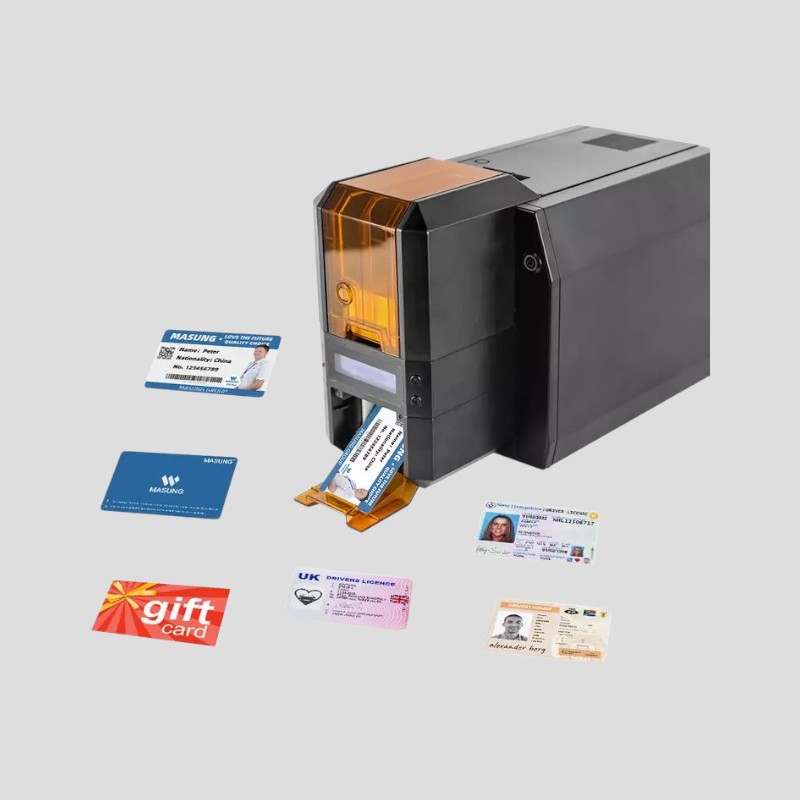
Caractéristiques de l’imprimante de cartes d’identification en bref :
Sortie haute qualité : Utilise l’impression par sublimation thermique pour produire des cartes d’identification couleur nettes.
Logiciel convivial : Logiciel de conception intuitif de style Office avec connexion à une base de données et une riche bibliothèque d’images.
Impression haute résolution avec alimentation automatique des cartes : L’imprimante de cartes d’identification recto simple produit des impressions à 300 DPI et alimente automatiquement jusqu’à 100 cartes.
Opération rationalisée : Conçue avec un magasin de cartes et une connectivité USB pour une impression et une maintenance fiables et simples.
Parfaite pour l’impression de cartes recto, y compris les cartes d’identité d’employé, les cartes d’identité avec photo, les cartes d’identité du personnel, les badges d’employé, les cartes d’étudiant, les cartes de membre en plastique, et bien plus encore.
Cliquez ici pour demander un devis ou en savoir plus sur la machine d’impression de cartes d’identification MS-CH22.
En passant, nous avons récemment lancé la série MS-S33 composée de 2 imprimantes de cartes d’identification sécurisées avec technologie d’impression par gravure laser. L’une est conçue pour imprimer la carte sur un côté, l’autre sur les deux côtés. Elles appartiennent toutes deux à la catégorie des « Systèmes d’émission centralisée », produisant un volume élevé de cartes et nécessitant le plus haut niveau de sécurité.
Elles sont idéales pour les grands systèmes universitaires ou les districts scolaires qui produisent des milliers de cartes au début de chaque semestre.
Masung MS-S33k Driver License Printing Machine with Dual-Sided Laser Engraving Printing Technology
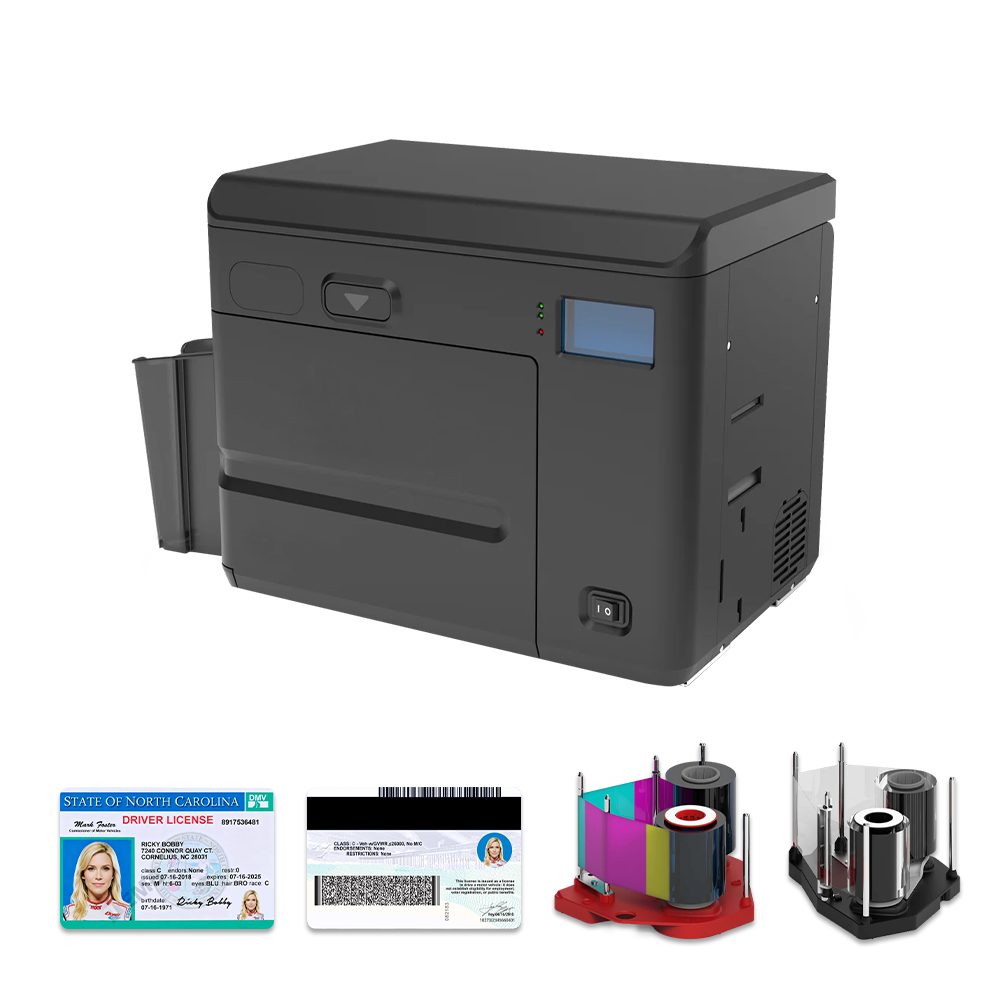
Brèves caractéristiques de la machine d’impression par gravure laser recto-verso MS-S33K :
Sécurité inégalée : Combine la gravure laser haute résolution avec du microtexte, de l’embossage et de la rasterisation pour produire des cartes d’identité nationales et des permis de conduire infalsifiables.
Technologie hybride d’impression & de gravure : Superpose des images couleur vibrantes via transfert thermique avec des données noires permanentes gravées au laser pour un ajustement parfait et une protection supérieure.
Production à haut volume efficace : Design de bureau compact avec une capacité de double magasin de 600 cartes et une vitesse allant jusqu’à 150 cartes par heure.
Laser & codage avancés : Équipée d’un laser à fibre MOPA de 3e génération de précision et d’un codage de carte à puce optionnel (MIFARE®, DESFire®) pour des justificatifs multifonctionnels.
Durabilité & polyvalence éprouvées : Conçue pour la fiabilité avec une durée de vie du laser de plus de 10 000 heures, servant de solution robuste à la fois pour l’impression de cartes laser et l’émission d’identifications sécurisées.
Cliquez ici pour demander un devis ou en savoir plus sur l’imprimante de cartes d’identification sécurisée.
Machine d’impression de permis de conduire Masung MS-S33 avec technologie de gravure laser
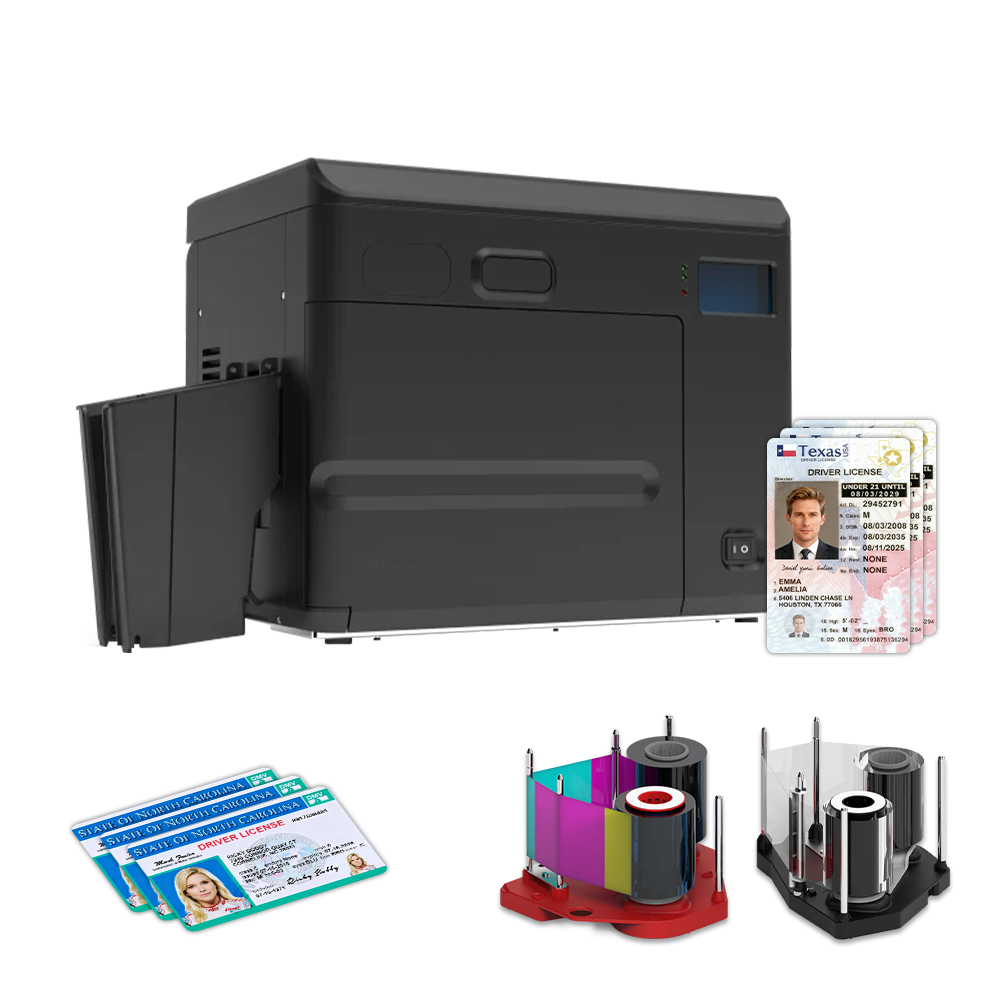
rèves caractéristiques de la machine d’impression par gravure laser recto simple MS-S33 :
Gravure laser haute sécurité sur plastiques composites pour produire des permis de conduire et des cartes d’identité sécurisées résistantes à la falsification.
Technologie hybride d’impression & de gravure qui superpose parfaitement des images couleur vibrantes avec des données permanentes gravées au laser pour une sécurité renforcée.
Design compact à haut volume avec double alimentation et une vitesse de 150 cartes/heure, idéal pour un environnement de bureau.
Laser à fibre MOPA avancé & codage intelligent délivre une sortie haute résolution et prend en charge les puces de cartes à puce sans contact optionnelles.
Conçue pour une utilisation durable et polyvalente avec une durée de vie du laser de plus de 10 000 heures, servant les besoins des secteurs gouvernemental, corporatif et privé.
Cliquez ici pour demander un devis ou en savoir plus sur l’imprimante de cartes d’identification sécurisée.
Pour plus d’informations sur l’une des imprimantes ci-dessus ou si vous souhaitez demander une solution personnalisable pour vos machines à imprimer des cartes d’identification, en tant que fabricant d’imprimantes de cartes d’identification avec plus d’une décennie d’expérience, le Groupe Masung est confiant dans sa capacité à fournir une solution parfaite pour répondre à vos besoins.